
Robotics sensor-data stack

From raw bags to training-ready datasets.

apairo is an open, modular Python toolkit for robotics sensor data. Profile any dataset in one command, then load, sync, transform and visualise LiDAR, images and trajectories through one numpy-native API.

$ pip install apairo

v0.8.0 · MIT licence · Python ≥ 3.11 · Cite

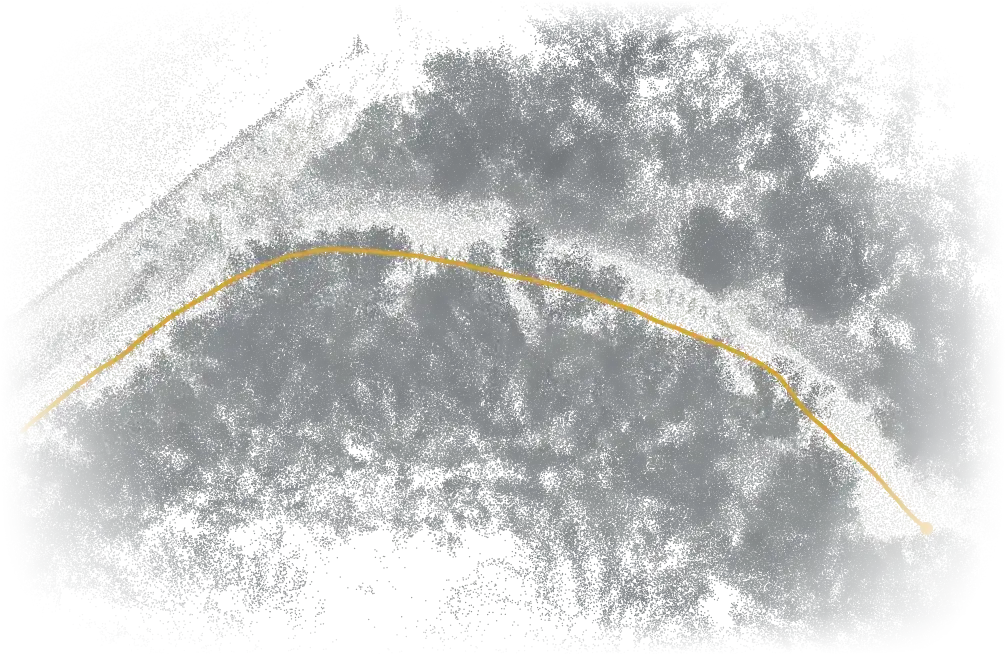
Top-down view of a forest trail reconstructed from LiDAR scans, with the robot's trajectory drawn along the path.
RELLIS-3D, sequence 00000: 80 LiDAR scans placed with their poses. The robot's trajectory is drawn in ochre.

Profile

Profile any dataset in one command.

Point apairo at a folder of sensor data and it tells you what is inside: every channel, its frame count, rate, time span, shape and dtype. Nothing is loaded into memory, and nothing in your data is rewritten.

~/data — apairo 0.8
$ apairo status field_run_01RawDataset - field_run_01   (sequence)----------------------------------------------------start       1726234567.00s   (span shown relative to this)channel                kind  loader  frames  rate      span         shapecmd                    raw   npy     360     20.0 Hz   0.02-17.97s  (2) float32imu                    raw   npy     1800    100.0 Hz  0.00-17.99s  (6) float64odom                   raw   npy     900     50.0 Hz   0.01-17.99s  (7) float64lidar (ouster_points)  raw   npys    180     10.0 Hz   0.03-17.93s  (2048, 4) float32events      3240issues      none$ apairo check field_run_01OK -- no issues
  1. 01

    Profile

    apairo status

    Frames, rate, time span, shape and dtype for every channel — read from timestamps and file headers, no data loaded. On a dataset root, --missing shows which sequences lack which channels.

  2. 02

    Register

    apairo init

    Detects each channel's loader — npy, bin, img, zarr, pcd — and records it under .apairo/. Idempotent, and it never rewrites your data.

  3. 03

    Declare

    apairo declare

    Scaffolds an apairo.yaml: aliases, field lists, clocks parsed straight from filenames. A file you own and version in git.

  4. 04

    Validate

    apairo check

    Schema validation that exits 1 on any issue, with --json output. Drops straight into CI.

apairo declare

Describe it once, in a file you own.

The scaffold fills in every loader it detects and guesses clocks from filenames — here a 19-digit nanosecond epoch. apairo reads apairo.yaml and never writes it; for a read-only mount, keep it elsewhere and pass declare=.

# apairo declaration -- how to read this dataset.
# This file is yours: apairo reads it and never edits it.
version: 1
channels:
  ouster_points:
    loader: npys
    alias: lidar                        # public name
    key: {name: '(\d+)$', units: [ns]}  # clock from filenames

apairo studio · apairo_visu

Then look closer, in the browser.

With apairo_visu installed, the same folder opens in Studio: a panel workbench driven by one frame slider, synchronised on the channel of your choice.

apairo studio field_run_01 --sync lidar
  • Frame metrics for every channel
  • Histograms, series charts and frame listings
  • 3D point clouds, BEV scatter and images
  • The whole pipeline as a clickable graph
apairo_visu on GitHub

Packages

Five packages, one pipeline.

Each package does one thing and hands off to the next. They share one data model, so they always agree on what a frame is. Only the apairo core is required.

  1. Extract
  2. Profile & load
  3. Transform
  4. Preprocess
  5. Visualise

apairoCore

Core · profile, load, sync

Unified Python loader for robotics sensor datasets — one API across synchronous and multi-rate asynchronous layouts. Profile a folder from the terminal, then read it where it lies: everything comes back as plain numpy arrays.

pip install apairo
  • apairo status · declare · check — profiling from the shell
  • RawDataset + apairo.yaml — any folder, zero writes
  • synchronize() — multi-rate rigs, tolerance, staleness
  • Lazy views — filter · split · join · concat · window · cache
  • Preprocess once — persisted, reloaded transparently
  • Calibration tree & camera intrinsics
  • npy · bin · img · zarr · pcd
  • SemanticKITTI · RELLIS-3D · GOOSE · TartanDrive 2.0

apairo_extractor

Ingest

Turn ROS bags into an apairo-native dataset. List every bag's duration, message counts and topic coverage first, then extract in parallel — from an interactive TUI or headless.

  • ROS 1 · ROS 2 · MCAP
  • Bag & topic coverage report (-l)
  • /tf → poses · /tf_static → calibration

apairo_transform

Runtime

Transforms and augmentations applied lazily at access time — nothing written to disk, no heavy dependencies.

  • Range · Height · Voxel · Subsample
  • Rotate · Flip · Scale · Noise · Point drop
  • SE(3) & linear interpolation for synchronize()

apairo_preprocess

Offline

Offline pipelines that compute a derived channel once and persist it: LiDAR odometry, ground segmentation, traversability ground truth, LiDAR-to-camera projection and bird's-eye-view rasters.

  • KISS-ICP · GICP odometry
  • CSF · RANSAC · from-labels ground
  • Traversability from trajectory or labels
  • LiDAR → camera projection · BEV rasterisation

apairo_visu

Visualise

Look at any dataset three ways — a browser Studio workbench, an Open3D viewer or Rerun — and draw your whole pipeline as a graph.

  • apairo studio — metrics, histograms, series
  • Open3D viewer · Rerun (.rrd, web)
  • Pipeline graph → Mermaid · SVG · HTML

your_package

Extend

Mechanisms live in the core, collections live in satellites. Register a subcommand and it shows up as apairo <tool> — exactly how extractor and studio plug in.

[project.entry-points."apairo.cli_plugins"]
mytool = "my_package.cli:main"

Quickstart

Loaded and training in a dozen lines.

The core ships on PyPI. Add only the layers you need — every package speaks the same numpy-native data model, so nothing has to be glued together by hand.

  1. Load any profiled folder — or a built-in dataset class.
  2. Sync sensors running at different rates onto one clock.
  3. Transform lazily — augment on access, leave disk untouched.
  4. Use raw arrays in PyTorch, JAX, anything.
Full documentation
quickstart.py
import apairo
from apairo_transform import RangeFilter, RandomSubsample

# 1 · Load — any folder apairo has profiled
ds = apairo.RawDataset(
    "/data/field_run_01",
    keys=["lidar", "imu", "cmd"],
)

# 2 · Sync — multi-rate sensors onto the lidar clock
view = ds.synchronize(
    reference="lidar", method="nearest", tolerance=0.05
)

# 3 · Transform — lazy, on access, nothing written to disk
view.transform("lidar", RangeFilter(max=50.0))
view.transform("lidar", RandomSubsample(1024))

# 4 · Use — plain numpy, ready for any framework
sample = view[0]
sample.data["lidar"]   # ndarray (1024, 4)  float32
sample.data["imu"]     # ndarray (6,)       float64

Overhead

No loading tax.

apairo reads the same bytes at the same throughput as a competent hand-rolled loader — the abstraction is paid for in index arrays, not I/O.

Benchmark harness
per-frame access
1.00–1.09×
the cost of a hand-rolled np.load loader, from 200 to 5,000 frames
synchronize()
0.12 ms
over 5,000 frames — index math, not I/O
a filtered view
0.2 KB
flat in dataset size — index arrays, not copies
runtime dependencies
2
numpy and PyYAML. No torch import, no framework lock-in

Synthetic microbenchmark of the framework cost only — not real-world I/O, GPU or distributed loading.

Cite

Using apairo in your research?

Please cite the archived release. The DOI below always resolves to the latest version on Zenodo.

Author
Augustin Bresset ORCID
Affiliation
U2IS, ENSTA, Institut Polytechnique de Paris
BibTeX
@software{bresset_apairo_2026,
  author  = {Bresset, Augustin},
  title   = {apairo: a unified loader for robotics sensor datasets},
  year    = {2026},
  version = {0.8.0},
  doi     = {10.5281/zenodo.22248230},
  url     = {https://github.com/apairo-robotics/apairo},
  license = {MIT}
}